Two-notes Live Manual de usuario
Busca en linea o descarga Manual de usuario para Audio Two-notes Live. Two Notes Live User Manual Manual de usuario
- Pagina / 37
- Tabla de contenidos
- MARCADORES

- TORPEDO Live 1
- TORPEDO Live User’s Manual 3
- Contents 5
- Foreword 7
- 2 Declaration of conformity 8
- 3 Contents of the package 9
- European Union 9
- 5 Warranty 10
- 1 What is a loadbox ? 11
- About the TORPEDO Live 13
- 2 Front panel 14
- 3 Rear panel 14
- 4 Only a speaker simulation ? 14
- 4.5 Create your own IRs 15
- 4.1 Tube Stage Output 15
- 4.2 Section EQ 15
- Connecting the TORPEDO Live 17
- 2 In the studio 18
- 3 On stage 19
- 1 The TORPEDO Live interface 21
- 2 Input gain control 21
- 4 PERFORM mode 22
- 5 EDIT mode 22
- 5.1 Power Amp 23
- 5.2 Miking 24
- 6 SETUP mode 25
- 7 MIDI setup 26
- 9 Want more cabinets ? 26
- 9.1 .tsr files 27
- 9.2 .tur files 27
- 1 PROGRAM CHANGE (PC) 29
- 2 CONTROL CHANGE (CC) 29
- Specifications 31
- 4 Technical data 33
- Technical support 35
Indice de contenidos
TORPEDO LiveProfessional digital loadboxUser’s manualV 1.4- 04/08/2014
Foreword5 WarrantyOROSYS SARL warrants that this TWO NOTES AUDIO ENGINEERING product shall be free of defects in parts andworkmanship when used under
Part 2Warning regarding the proper use of aloadbox with a tube amplifier1 What is a loadbox ?In the normal use of a tube amplifier, it is recommended to
Warning regarding the proper use of a loadbox with a tube amplifier2 Which output volume for my amplifier ?The correct use of your amplifier with a loadb
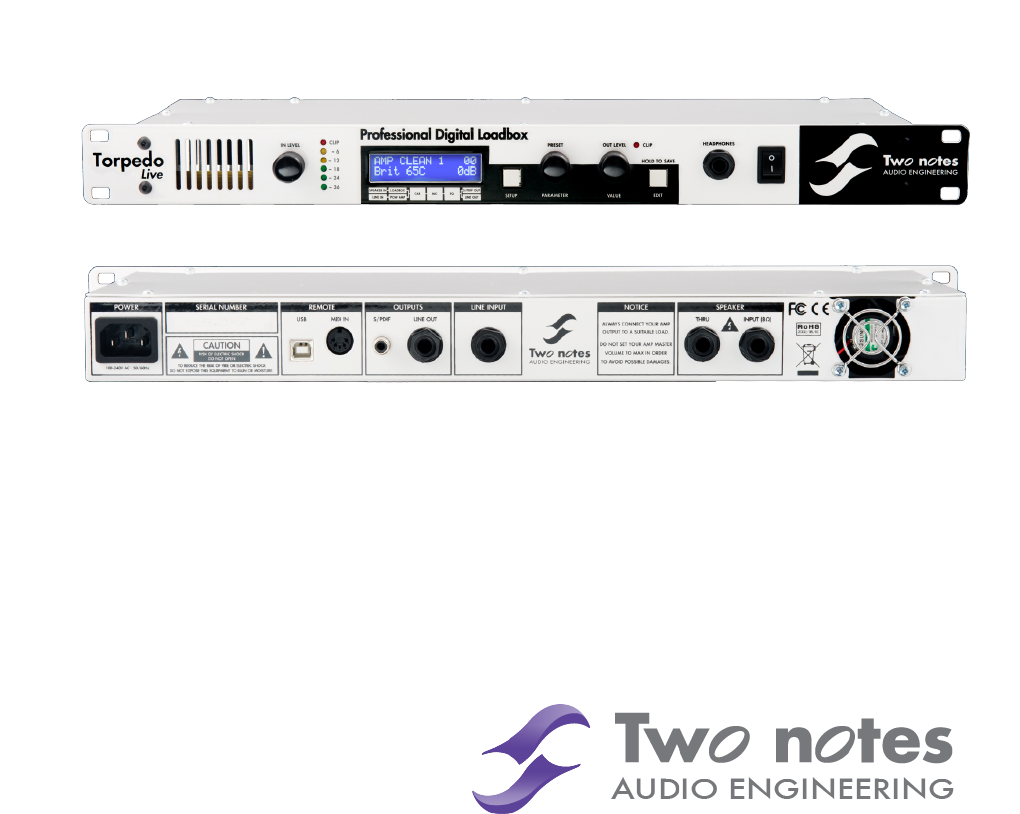
Part 3About the TORPEDO Live1 Introducing the TORPEDO LiveTwo Notes Audio Engineering is proud to introduce the TORPEDO Live, the optimized for live p
About the TORPEDO Live2 Front panelFigure 3.1: Front panel of the TORPEDO Live1 Ventilation slit 4 SETUP button 7 EDIT/SAVE button2 Input gain 5 PRESE
About the TORPEDO LiveThe miking is achieved in 3 steps with the TORPEDO Live:1. choose a power amplifier (or switch it off if you are using a loadbox)
Part 4Connecting the TORPEDO Live1 OverviewThe TORPEDO Live offers a solution for silent and quality sound pick-up in many situations. The following i
Connecting the TORPEDO Live2 In the studioThe studio setup shown here is an integration of the TORPEDO Live in a usual Digital Audio Workstation.Plug
Connecting the TORPEDO Live3 On stageThe analog I/O of the TORPEDO Live offers great options on stage. For example, the analog output can beconnected
Part 5Configuring and using the TORPEDO Live1 The TORPEDO Live interfaceThe TORPEDO Live parameters are organized in menus, accessible by different pus
Configuring and using the TORPEDO Live4 PERFORM modeThe PERFORM mode is the default mode you will see when first using the TORPEDO Live. You will have t
Configuring and using the TORPEDO LiveOn a parameter page (change the page with the PARAMETER en-coder), you will see on the first line the module name,
Configuring and using the TORPEDO Live• Presence: This setting affects the tube stage frequency (loudness).• Depth: this setting affects the tube stage
Configuring and using the TORPEDO Live6 SETUP modeBouton FonctionSETUP Return to PERFORM modePRESET/PARAMETER Navigate the parametersOUT LEVEL/VALUE Se
Configuring and using the TORPEDO Live7 MIDI setupThe MIDI parameter can be found on the SETUP mode. The TORPEDO Live handles both preset change com-ma
Configuring and using the TORPEDO Live9.1 .tsr filesThe .tsr files are the official Two Notes cabinet and microphones format. Two Notes provides new cabin
Part 6MIDIYour TORPEDO Live can receive MIDI PROGRAM CHANGE (PC) and CONTROL CHANGE (C) commands sent byany kind of MIDI controller connected to the M
TORPEDO Live User’s ManualManual Version V 1.4 - 04/08/2014.The complete electronic version of this manual, as well as the Two Notes Audio Enginering
MIDIParameter name CC] RangeBehaviourPower AmpOn/Off 0 0 - 10 = Off ; 1 = OnModel 1 0 - 70 = Model ]0 ; 1 = Model ]1...Volume 2 0 - 300 = 0dB% ; 30 =
Part 7Specifications1 Power Amplifier listDesignationCharacteristicsSE 6L6Configuration Single Ended - Class A with 6L6SE EL34Configuration Single Ended -
Specifications3 List of speaker cabinets embedded in the TORPEDO LiveDesignation Inspired byEmbedded GUITAR cabinets2Notes CSG Two Notes Custom 1x12&qu
Specifications4 Technical dataDesignationCharacteristicsSpeaker InputJack 6.35mm (1/4") unbalanced (TS, Tip/Sleeve)Maximum input voltage: 280 Volt
SpecificationsDesignationCharacteristicsS/PDIFSampling frequency: 48 KHz or 96 KHzMaster only, no external synchronizationWet signal on left channel, d
Part 8Technical supportShould you encounter a problem with your TORPEDO Live or need help regarding any technical aspects, pleasenote that Two Notes A
http://www.two-notes.com/
Contents1 Foreword 71 Safety instructions . . . . . . . . . . . . . . . . . . . . . . . . . . . . . . . . . . . . . . . . . . . . . . . . . 71.1 Risk
6 SETUP mode . . . . . . . . . . . . . . . . . . . . . . . . . . . . . . . . . . . . . . . . . . . . . . . . . . . . 257 MIDI setup . . . . . . . . .
Part 1Foreword1 Safety instructionsBefore using the product, it is necessary to carefully read and to bear in mind the following informations. Keepthi
Forewordwith the machine complies with the standards of the country where you purchased the product. If replacementis needed, please use a standard co
Foreword3 Contents of the packageThe shipped package contains:1. One TORPEDO Live unit in a protecting sleeve,2. One mains power cable,3. One USB cabl
Mas documentos para Audio Two-notes Live

Relacionado con productos y manuales para Audio Two-notes Live
 (37 paginas)
 (35 paginas)
(28 paginas)
(29 paginas)
(51 paginas)
(51 paginas)
(35 paginas)
(35 paginas)
(28 paginas)
(29 paginas)
(51 paginas)
(51 paginas)
© 2020, manymanuals.es. Todos los derechos reservados | 0.032 s |
 Manymanuals.com
 Manymanuals.de
 Manymanuals.fr
 Manymanuals.it
 Manymanuals.pl
 Manymanuals.cz
 Manymanuals.es
 Manymanuals-pt.com
Comentarios a estos manuales